
In this tutorial, we will show you how to exclude TOC on the same URL path by following the below steps:
Step 1: First, you must install and activate our Easy Table of Contents plugin.
Step 2: Go to the Easy Table Of Contents settings under the Settings section which you will find in the dashboard on the left side of your window.

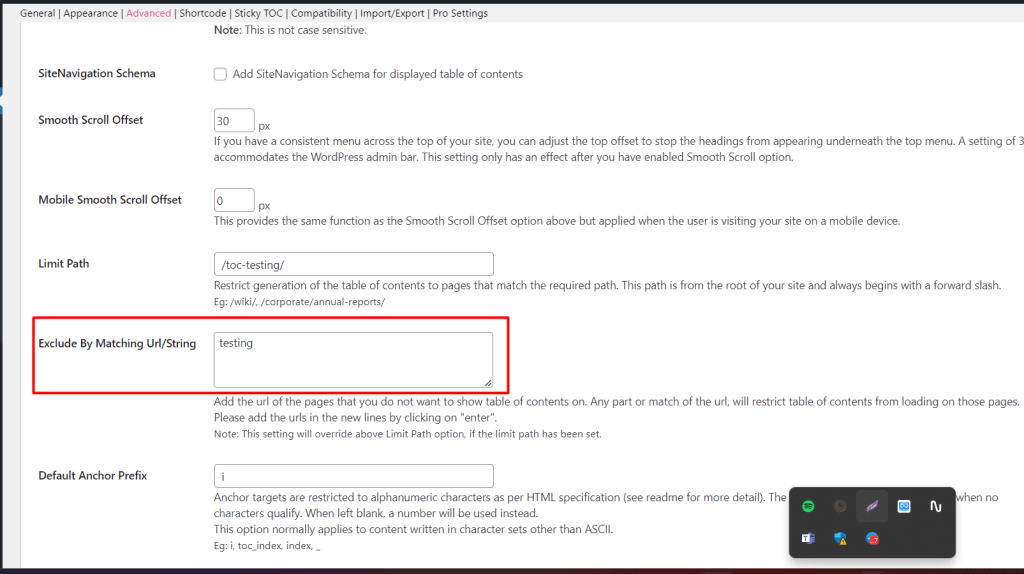
Step 3: Now Scroll down to the bottom, and here you will find the Advance option. Under the Advance options, you can see an option named Exclude By Matching Url/String . This option helps you exclude TOC on the same URL path.
Below, we have added the output video for your better understanding.
In the below video, we have added the testing from our post URL in the Exclude By Matching Url/String option, and TOC will not show on the URL that contains name testing.
That’s it for this tutorial!
We hope we’ve cleared your doubts in case you have any feedback or questions, then please share them in the comments section below.
Or you Just contact us here and we are always available for you.
